Six sources, one short list of decisions
Pinterest, Kit, Google Analytics, Search Console, Facebook and Raptive each have a dashboard, and none of them says what to do on Monday. Blogcastr reads all six together and turns them into decisions you approve with one tap: re-save this, pin that, send more of these. Pinterest and Kit connect at launch. The other four follow.
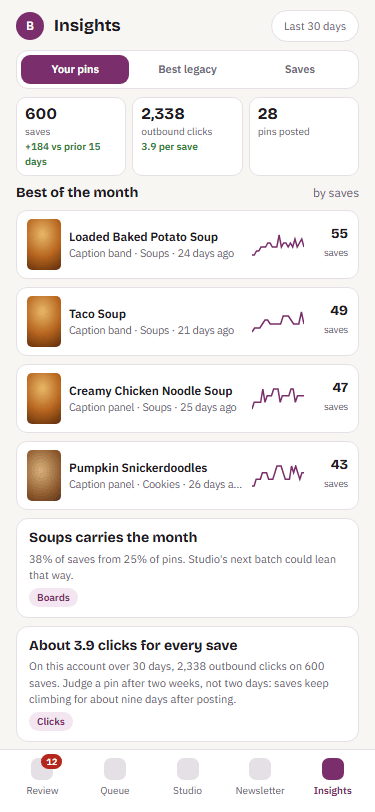
What it does with what it sees
Re-save the winners
The pins that keep bringing readers get saved again to a fresh board when their season comes round. You approve each one, or turn on auto-approve once you trust it.
Pin what is rising
A recipe climbing in Google this week gets a fresh pin right away.
Change what the newsletter sends
Next week's ideas are ranked by what your list clicked. The monthly report names what worked and what to rest.
Put the earners first
With Raptive connected, the recipes that pay get the in-season slots on Pinterest and in your emails, and the report says what that was worth.
Catch a drop early
A post that lost search traffic or a board that stopped bringing clicks shows up as a sentence the week it happens, with the usual causes to check.
One monthly report
What worked, what did not, and three changes Blogcastr proposes. Each change is a button. Written in words, with the numbers behind a tap.
What each one tells you, and what Blogcastr does about it
| Source | What it tells you | What Blogcastr does |
|---|---|---|
| Which layouts and boards bring readers to your blog, which recipes Pinterest readers want, and which pins are past their peak. | Re-saves the winners to a fresh board in season. Moves the recipes Pinterest is already finding to the front of the line. | |
| Kit | Which emails and subject lines your list opens, which recipes they click, and which themes have gone stale. | Ranks next week's ideas by what your list clicked. The monthly report names what to send more of. |
| Google Analytics | What a pin or an email did on the blog itself. Which recipes are rising this month and which are slipping. | Rising recipes get a fresh pin and a newsletter slot while the rise is happening. |
| Search Console | Which recipes Google is starting to show, which seasonal searches are opening up early, and which posts lost ground. | A recipe climbing in search gets a fresh pin and a place in an email now. |
| Which recipes travel on Facebook, which do not, and which days and kinds of post get clicked. | Recipes that travelled on Facebook are offered as newsletter leads and pin candidates while they are warm. | |
| Raptive | Which recipes earn, which earn only in season, and which get traffic that does not pay. | Earners get the in-season pins and the newsletter slots first. The monthly report says what each change was worth. |
Every decision is proposed, never taken on its own, unless you turn on auto-approve for that kind of decision.
Built from years of reading these by hand
For years, Karl pulled Pinterest, Kit, Analytics, Search Console, Facebook and Raptive for Mary's three sites into one place and wrote down what to change. The changes were the same handful every month. Insights is that sheet with the pulling done and the changes as buttons.
What Insights does not do
- Pinterest Trends?
- No. Pinterest shows you Trends for free in its own app.
- Benchmarks against other bloggers?
- No. Your sites against themselves over time, which is the comparison that changes what you do.
- Every pin on my Pinterest account?
- The pins Blogcastr posted, with full history, plus your top pins as Pinterest ranks them.
- Which connect on day one?
- Pinterest and Kit. Google Analytics, Search Console, Facebook and Raptive follow as each connection is approved. The report says which sources it was written from.
- How long is history kept?
- Everything Blogcastr pulls is kept, so your history grows past the window Google and Pinterest show you.
- What happens when I disconnect a source?
- Everything pulled from that source is deleted. The decisions it informed stay as history.