Set up once. Then it runs.
Five steps from connecting your blog to your first pins and emails. The same guide is inside the app if you ever need it again.
- 1
Connect Pinterest
Sign in with Pinterest and choose the account. Blogcastr only asks for permission to post pins, create boards and read the results of what it posts.
- 2
Add your blog
Paste your address. Blogcastr reads your recipe cards and structures your recipes so they are ready to become pins and emails.
- 3
Pick layouts
Turn on the layout families that look like your blog and set your brand colours and fonts. You choose once. Every pin after that is yours.
- 4
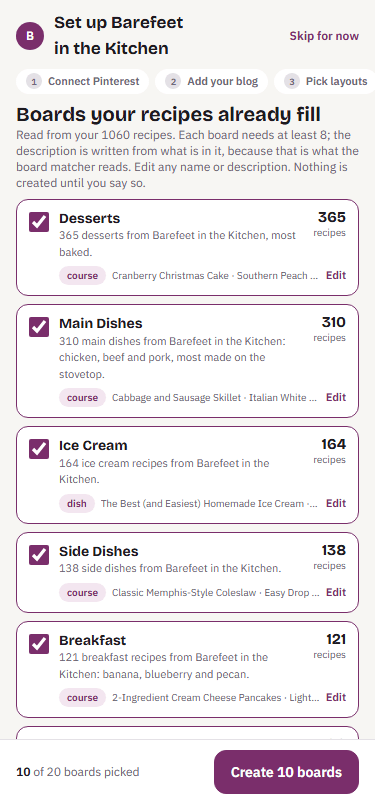
Starter boards
Blogcastr looks at what you have and proposes boards to match, with descriptions written from your recipes. Skip any you already have. Nothing is created on Pinterest until you say so.
- 5
First pins
Blogcastr makes pins for your newest recipes and the ones that have waited longest. Approve what you like. The queue posts them at your times.
A Monday that takes ten minutes
Review on your phone while the coffee brews. Check the queue once to see the week is covered. Tap the newsletter idea you like, read the draft, approve. The rest of the week Blogcastr posts what you said yes to, and nothing else.